
Use Preczn Docs with AI Tools
Give AI coding assistants and agents the Preczn guides and API reference through llms.txt, Markdown pages, and the Preczn MCP server.
You can give an AI coding assistant or agent the Preczn docs in three ways. This page explains which to use, gives you instructions to paste into your agent's configuration, and shows how to connect the Preczn MCP server.
Choose an access method
| Method | What the agent gets | Use it when |
|---|---|---|
| llms.txt | An index of every docs page, grouped by section, most with a one-line description | The agent needs to find the right guide for a task |
| Markdown pages | The full text of any page as Markdown. Add .md to the page URL, or send the header Accept: text/markdown. | The agent needs a page's complete content |
| Preczn MCP server | Tools to search the API reference, read endpoint schemas, and call Preczn API endpoints | The agent runs in an MCP-aware tool and needs endpoint details |
Most agents need llms.txt and Markdown pages. Every page's Markdown already points agents to llms.txt. Add the MCP server when the agent writes or tests API calls.
The MCP server covers the API reference only. It can't search the guides, so give the agent llms.txt as well.
Instructions for your agent
Paste this block into your project's AGENTS.md, CLAUDE.md, Cursor rules, or the equivalent file for your tool:
## Preczn
- Read https://docs.preczn.com/llms.txt first. It lists every Preczn docs page with a short description.
- To decide what to build, start with the pages under "Use Cases".
- For step-by-step instructions, read the linked guides. Fetch any page as Markdown by adding .md to its URL.
- For request and response fields, use the API reference, or the Preczn MCP server if it's connected.
- Use test mode API keys while building: https://docs.preczn.com/docs/live-vs-test-mode
- Never put real card numbers, CVVs, or bank account numbers in prompts, code, logs, or test data.
Connect the Preczn MCP server
The Preczn MCP server gives AI agents tools to:
- Search the API reference for endpoints by name or keyword
- Read endpoint details, including request and response schemas
- Call Preczn API endpoints, except processing transactions and creating or updating tokens, which are turned off
Model Context Protocol (MCP) is an open standard that lets AI applications use external tools and data sources. Preczn hosts a remote MCP server at https://docs.preczn.com/mcp. To connect your tool, follow the steps for it:
Click the following to install:

OR
Manually add the following your project's.mcp.json file:
{
  "mcpServers": {
    "preczn": {
      "url": "https://docs.preczn.com/mcp"
    }
  }
}
Manually add the following your project's .ai/mcp/mcp.json file:
{
  "mcpServers": {
    "preczn": {
      "url": "https://docs.preczn.com/mcp"
    }
  }
}
Manually add the following to themcpServers section of your project's .mcp.json file:
"preczn": {
  "url": "https://docs.preczn.com/mcp"
}
Add the following section to the Codex.config.toml file:
[mcp_servers.preczn]
url = "https://docs.preczn.com/mcp"
Add the following to themcpServers section of the .gemini/settings.json file in your project:
"preczn": {
  "url": "https://docs.preczn.com/mcp"
}
Click the following to install:

OR
Manually add the following to the Cursormcp.json file:
"preczn": {
  "url": "https://docs.preczn.com/mcp"
}
manually add the following to themcpServers section Windsurf mcp_config.json file:
"preczn": {
  "url": "https://docs.preczn.com/mcp"
}
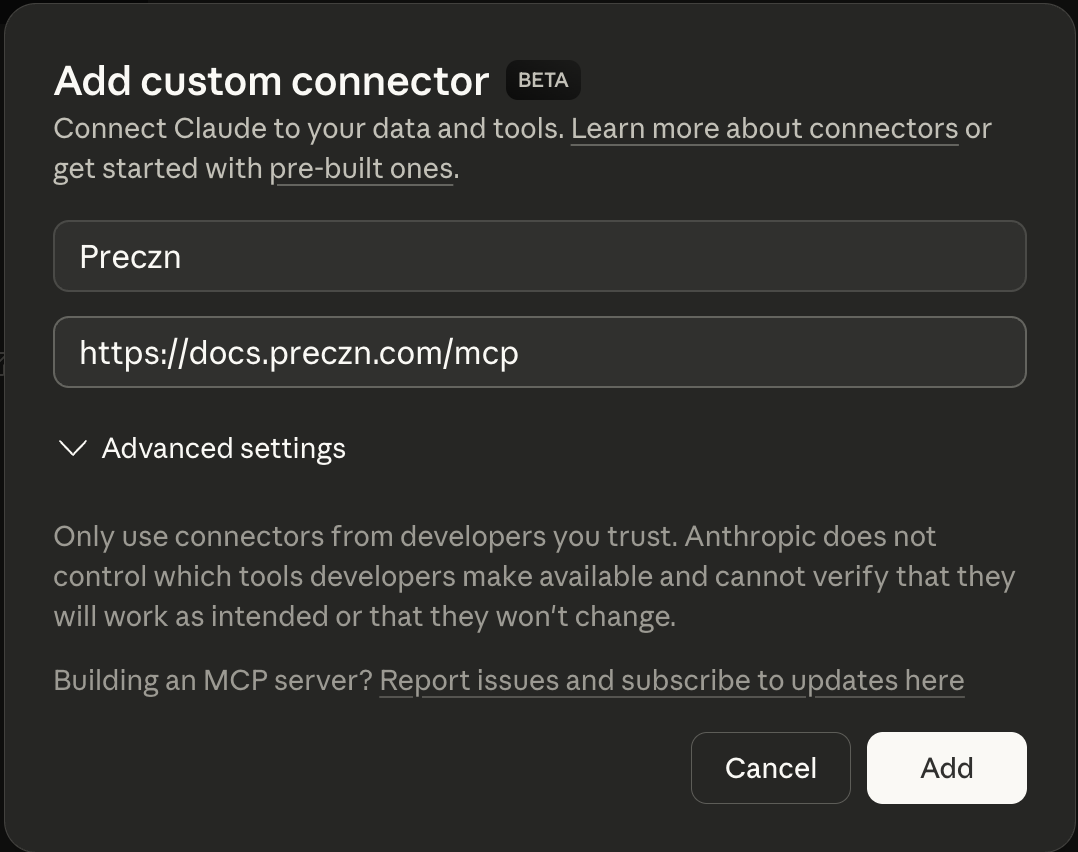
Perform the following in Claude Desktop:
- Navigate to
Settingsin Claude Desktop- Choose
Settingsfor personal accounts - Choose
Admin Settingsfor organization-managed accounts
- Choose
- Navigate to
Connectors - Scroll to the bottom and click the
Add custom connectorbutton - Enter the following for the connector settings:
- Name:
Preczn - URL:
https://docs.preczn.com/mcp
- Name:
- Click the
Addbutton
Test your setup
- Open your AI tool and start a new chat.
- To test guide access, ask: "Using the Preczn docs, how do I move stored cards from another processor to Preczn?" The answer should cite Migrate from Another Processor and Token Import.
- To test the MCP server, ask: "Which Preczn API endpoint lists a merchant's locations?" The answer should name the endpoint and its parameters from the API reference.
Updated about 2 hours ago