---
updatedAt: 2026-11-06T16:34:35.000Z
agentTools:
projectIndex: https://docs.preczn.com/llms.txt
---
# Jack Henry
Board merchants to Jack Henry for ACH processing, supply per-location ACH limits, and track application status.
## Overview
Jack Henry processes ACH (check and bank debit) payments for merchants. In Preczn, Jack Henry is a **boarding-only** connection: Preczn submits the merchant's application to Jack Henry and tracks it through approval, but payments don't route through Preczn. Boarding a merchant takes three steps:
1. **Configure the connection.** Add your Jack Henry credentials and contact details once, at the platform level.
2. **Collect the merchant's data.** Collect business, owner, banking, and document details, plus ACH limits for each location and a primary contact.
3. **Board the merchant.** Preczn submits the application, then checks Jack Henry for status changes once a day and sends you a webhook on each change.
For general boarding, see [Merchant Onboarding](merchant-onboarding), [Onboarding Data Requirements](onboarding-data-requirements), and [Boarding Forms](boarding-forms).
## Configuring the Connection
In the Dashboard, go to **Connections → Add Connection** and select **Jack Henry**. Jack Henry supplies every value in this table.
| Dashboard field | Required | Description |
| -------------------------------- | -------- | --------------------------------------------------------------------------------------------------------------------------------- |
| **Client ID** | ✅ Yes | The client ID for the Jack Henry API. |
| **Client Secret** | ✅ Yes | The client secret for the Jack Henry API. |
| **Customer Service Provider ID** | ✅ Yes | The provider ID Jack Henry issued to your platform. Preczn sends it with every application. |
| **Request Email** | ✅ Yes | The email address Jack Henry registered for your API requests. Jack Henry rejects applications sent with an unregistered address. |
| **Velocity Recipient Email** | ✅ Yes | The address that receives Jack Henry's ACH limit (velocity) notifications. |
| **FI Recipient Email** | ✅ Yes | The address that receives Jack Henry's financial institution notifications. |
| **File Upload Client ID** | ✅ Yes | The client ID for Jack Henry's document-upload service. Jack Henry issues this separate credential set for uploading documents. |
| **File Upload Client Secret** | ✅ Yes | The client secret for the document-upload service. |
| **File Upload Username** | ✅ Yes | The username for the document-upload service. |
| **File Upload Password** | ✅ Yes | The password for the document-upload service. |
> :information\_source: **Two credential sets**
>
> Jack Henry issues one credential set for submitting applications (**Client ID** and **Client Secret**) and a separate set for uploading documents (the four **File Upload** fields). Preczn uses the document-upload set to send each merchant's voided check and bank statements.
Click **Verify connection** to check the credentials, then click **Connect**. Preczn checks the credentials with Jack Henry before it stores the connection, against the test or live environment that matches the mode you're in. If Jack Henry rejects them, Preczn doesn't save the connection and shows the reason.
> :information\_source: **Test and live credentials are different**
>
> Jack Henry issues a separate credential set for each environment. Use your test credentials in Test mode and your live credentials in Live mode. See [Live vs Test Mode](live-vs-test-mode).
## Required Merchant Data
Preczn automatically creates a **Default JackHenry Requirements** template when you add the connection. Until a merchant meets every requirement, its Jack Henry connection stays in **Requirements**, and `missingRequiredData` lists what's missing. For how requirements are evaluated, see [Onboarding Data Requirements](onboarding-data-requirements).
| Area | What Jack Henry requires |
| ------------------- | ------------------------------------------------------------------------------------------------------------------------------------------------------------------------------------------------------------------------------------------------------------- |
| **Business** | DBA name, legal name, phone, tax ID (EIN), address, city, state, postal code, website, business type, date established, and NAICS classification code |
| **Owners** | For every owner: first and last name, title, phone, email, ownership percentage, date of birth, full SSN, driver's license number and state, and home address. Exactly one owner must be the primary representative. See [Primary Officer](#primary-officer). |
| **Banking** | Account name, routing number, account number, and account type |
| **Locations** | At least one location, each with a settlement account and ACH limits. See [Locations and ACH limits](#locations-and-ach-limits). |
| **Documents** | A voided check and bank statements from the last three months |
| **Primary contact** | One person assigned to the Jack Henry primary contact role. See [Primary contact](#primary-contact). |
> :warning: **Partnerships need at least two owners**
>
> Jack Henry rejects a partnership application that lists only one owner.
> :information\_source: **US businesses only**
>
> Jack Henry boards US businesses. Addresses, phone numbers, and states must be in US formats.
### Account name
Jack Henry uses the bank account's **account name** as the location's name on the merchant's bank statement.
> :warning: **Enter the name on the bank statement, not the bank's name**
>
> Set `accountName` to the name of the location as it appears on the bank statement. It is **not** the name of the financial institution. For example, use the business's statement name, not "First National Bank". The boarding form shows the same guidance under the account name field.
### Primary Officer
Jack Henry emails the **Primary Officer** to review and e-sign the application and Jack Henry's terms and conditions. Preczn sends the owner with `primaryRepresentative: true` as the Primary Officer, regardless of ownership percentage. Preczn sends the other owners as additional officers, from the highest ownership percentage to the lowest.
Exactly one owner must have `primaryRepresentative: true`. In the dashboard and on a boarding form, this is the **Primary Representative** checkbox on the owner. If no owner, or more than one owner, is the primary representative when you board the merchant, Preczn doesn't submit the application. The connection moves to **Error**, and `actionDescription` says how many owners are marked.
> :information\_source: **The Primary Officer and the primary contact are different roles**
>
> The Primary Officer is always an owner and signs the application. The [primary contact](#primary-contact) receives application-status emails and can be any owner or merchant contact. One person can hold both roles.
### Primary contact
Jack Henry needs one **primary contact** for each application: the person who receives Jack Henry's application-status emails. The contact can be an existing owner or a merchant contact, and the contact must have a title.
On a boarding form, the merchant assigns the primary contact on the **Jack Henry Contacts** step. The merchant picks an existing owner or contact, or adds a new contact. The merchant can't continue until the chosen person has a title.
Without a boarding form, assign the contact to the `jackHenryPrimary` role with [Set per-role contact assignments for a merchant's connection](https://docs.preczn.com/reference/putmerchantconnectioncontactroles). Until a primary contact is assigned, the connection stays in **Requirements**.
> :information\_source: **Preczn doesn't email your merchants**
>
> Jack Henry emails the primary contact about the application. Preczn doesn't send merchants any email. To notify merchants yourself, subscribe to [merchant webhooks](merchant-webhook-payloads).
### Documents
Upload a **voided check** and one or more **bank statements** to the merchant. Preczn sends them to Jack Henry right after the application is created.
Upload each document as a PDF or JPEG file of 4.3 MB or less.
> :warning: **Jack Henry doesn't accept PNG files or files over 4.3 MB**
>
> Preczn accepts PNG files and files up to 5 MB, but Jack Henry rejects both. If you upload one, it fails when Preczn sends it to Jack Henry. The connection then moves to **Error**, and `actionDescription` names the file.
## Locations and ACH limits
Every Jack Henry application needs at least one location. For each location, Jack Henry needs:
* **A settlement account.** One of the merchant's bank accounts, where the location's payments deposit.
* **ACH limits.** Five limits on the check and ACH debits the location can accept.
| Field | Type | Description |
| ------------------------ | ---------------------- | ----------------------------------------------------------------------------------------- |
| `debitSingleTransAmount` | Number (whole dollars) | The largest single check or ACH debit the location needs to accept. |
| `debitSingleDayAmount` | Number (whole dollars) | The highest combined amount the location needs to accept in one day. |
| `debitPeriodAmount` | Number (whole dollars) | The highest combined amount the location needs to accept in a two-week (14-day) period. |
| `debitSingleDayCount` | Number | The most checks or ACH debits the location needs to accept in one day. |
| `debitPeriodCount` | Number | The most checks or ACH debits the location needs to accept in a two-week (14-day) period. |
These are hard limits: Jack Henry declines any check or ACH payment above a limit.
### Rules for ACH limits
Send each limit as a whole number greater than 0. Within each group, a limit must be equal to or greater than the one before it:
* **Dollar limits:** `debitSingleTransAmount` ≤ `debitSingleDayAmount` ≤ `debitPeriodAmount`
* **Count limits:** `debitSingleDayCount` ≤ `debitPeriodCount`
Equal values are allowed. For example, a location that accepts at most one check a day can send the same value for `debitSingleTransAmount` and `debitSingleDayAmount`.
### Choosing how to collect location data
You collect locations and ACH limits in one of two ways. Use the one that matches how you board merchants:
* **Boarding form.** The merchant enters locations, settlement accounts, and ACH limits on the form, and Preczn saves them. You don't call the Locations API. See [On a boarding form](#on-a-boarding-form).
* **API.** Your platform creates and updates locations with the Locations API. See [Through the API](#through-the-api).
### On a boarding form
The merchant supplies each part of the location data on a different step:
1. **Business Location.** The merchant adds each location.
2. **Banking.** Under **Settles payments for**, the merchant ticks the locations whose payments deposit to each bank account.
3. **Jack Henry ACH Setup.** The merchant enters the ACH limits for each location.
The **Jack Henry ACH Setup** step opens with instructions, a definition of each limit, and the hard-limit warning. The merchant can hide the instructions, but the warning always shows.
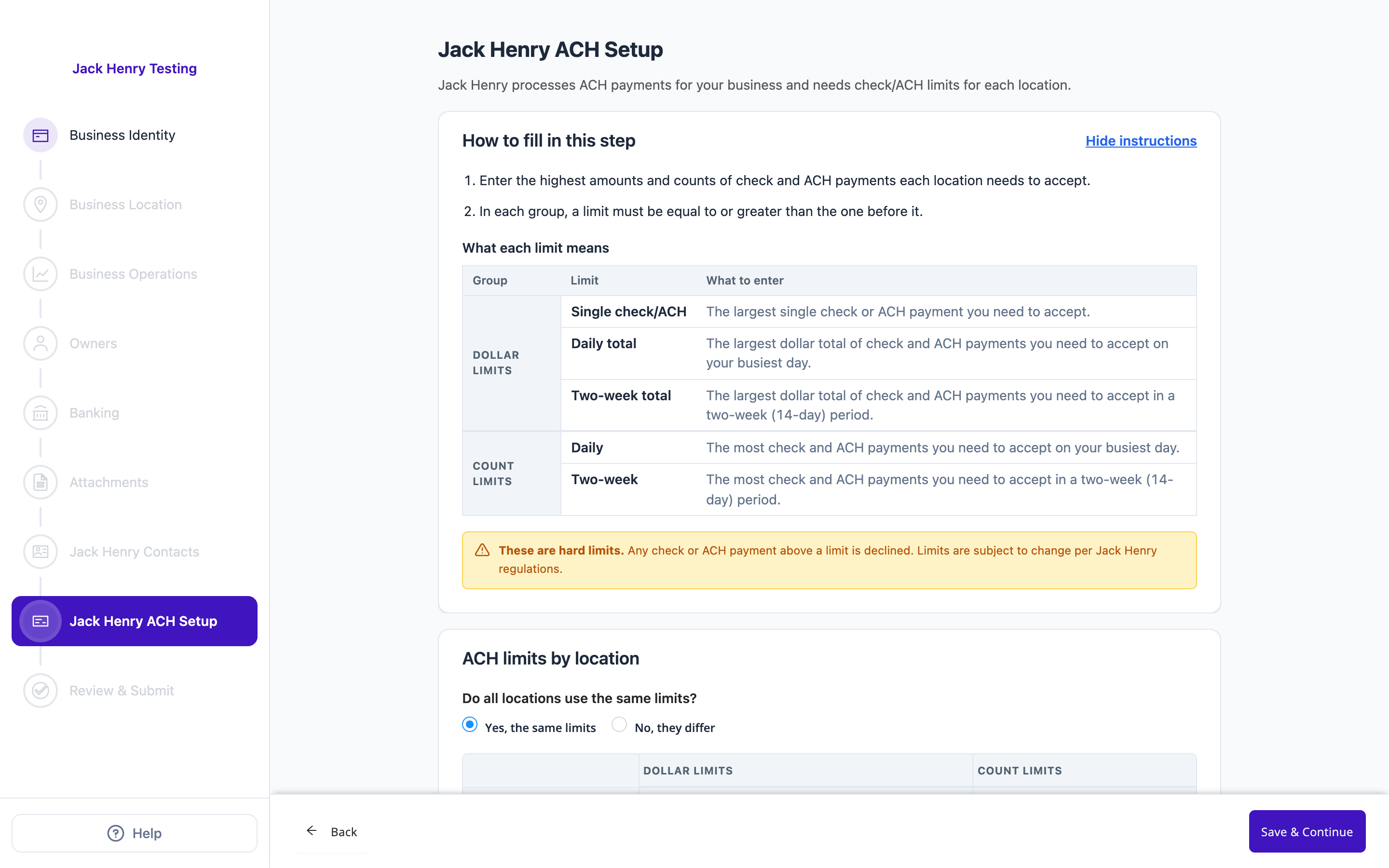
Below the instructions, the merchant enters every location's limits in one table. When a value breaks a rule, the field shows the lowest value it allows. **Save & Continue** stays disabled until every location has all five limits and every limit follows the rules.
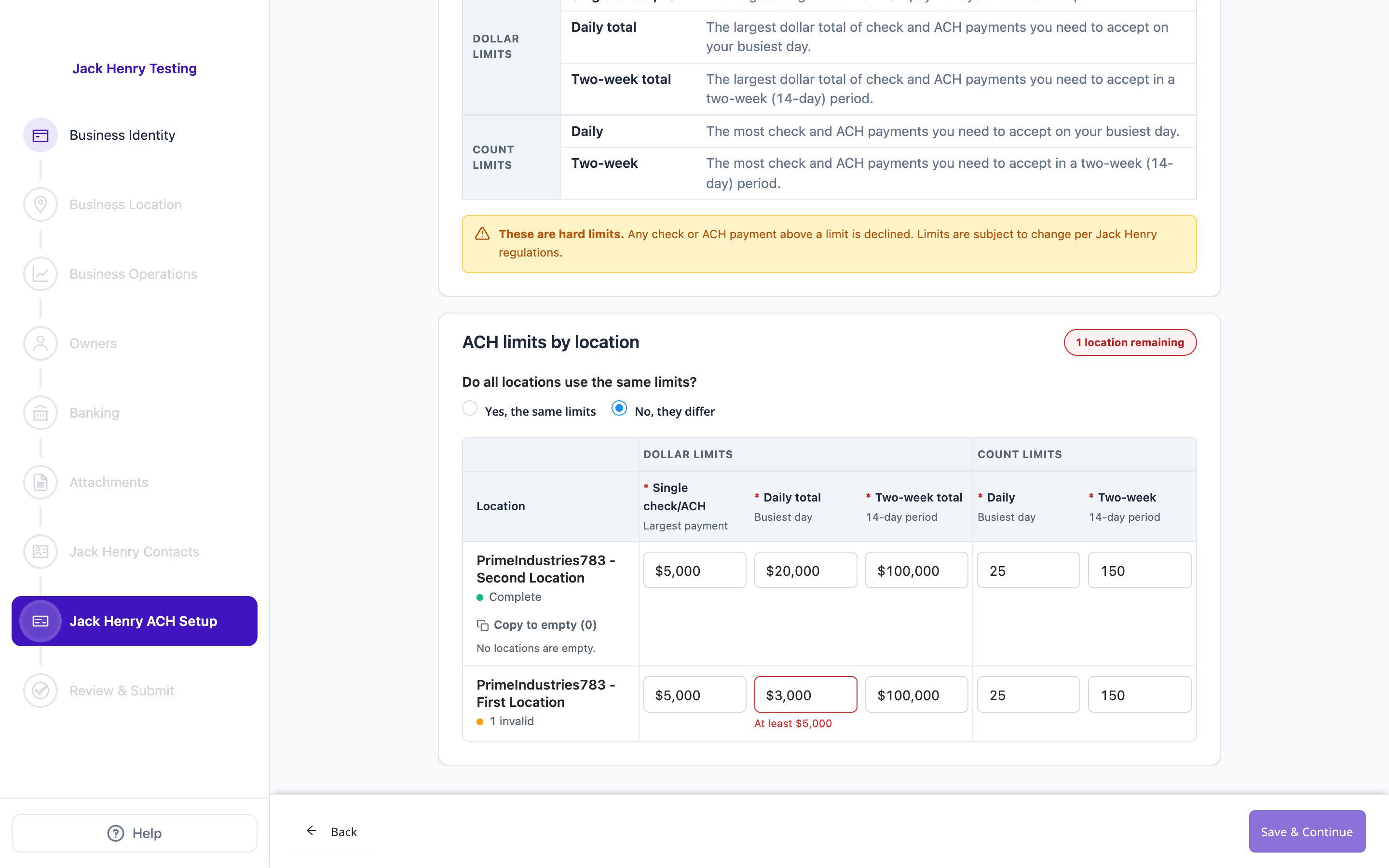
* **Same limits.** With two or more locations, the merchant first answers **Do all locations use the same limits?** With **Yes, the same limits**, the merchant fills in one row, and Preczn saves its values to every location.
* **Copy to empty.** When the locations differ, **Copy to empty** copies the first location's limits into every location that has no limits yet. It never overwrites values already entered.
### Through the API
If you board merchants through the API, create each location with the [Locations API](https://docs.preczn.com/reference/createmerchantlocation). Set the location's `bankingId` to one of the merchant's bank accounts, and send the ACH limits in the location's `connectionData` array, in an entry whose `processor` is `JackHenry`.
If a limit breaks a rule, Preczn returns a `400`, saves nothing, and names the first problem it finds. For example, a `debitSingleDayAmount` of 9000 with a `debitSingleTransAmount` of 15000 returns:
```json 400 Bad Request
{
"statusCode": 400,
"message": "connectionData entry for processor 'JackHenry': debitSingleDayAmount must be greater than or equal to debitSingleTransAmount.",
"error": "Bad Request"
}
```
#### Creating a location
To create a location with its Jack Henry entry, send the location's details, its `bankingId`, and a `connectionData` array with one `JackHenry` entry. Don't include an `id` in the entry.
```json POST /v1/merchants/{merchantId}/locations
{
"name": "Main Street Office",
"address": {
"address1": "100 Main St",
"city": "Springfield",
"region": "MO",
"postal": "65801",
"country": "USA"
},
"mcc": "1711",
"phone": "+14175550100",
"bankingId": "midBank_test_5kaft3yde39cssvv3w389kens8",
"connectionData": [
{
"processor": "JackHenry",
"debitSingleTransAmount": 5000,
"debitSingleDayCount": 25,
"debitSingleDayAmount": 20000,
"debitPeriodCount": 150,
"debitPeriodAmount": 100000
}
]
}
```
Preczn assigns the entry an `id` and returns it in the response. The `id` starts with `midLocCon_`, or `midLocCon_test_` in Test mode:
```json Response (excerpt)
"connectionData": [
{
"id": "midLocCon_test_8vq3nd7xk2mp5wr9tj4hc6yb0e",
"processor": "JackHenry",
"debitSingleTransAmount": 5000,
"debitSingleDayCount": 25,
"debitSingleDayAmount": 20000,
"debitPeriodCount": 150,
"debitPeriodAmount": 100000
}
]
```
Keep this `id`. You need it to update the entry later.
A location can have only one entry for each processor. Preczn rejects a request that includes two `JackHenry` entries.
#### Updating connectionData
When you update a location, the `connectionData` array you send **replaces** the stored array. Preczn compares the two by `id`:
* An entry with an `id` updates that stored entry.
* An entry without an `id` creates a new entry.
* **A stored entry whose `id` is missing from the array you send is deleted.**
> :warning: **Leaving an entry out deletes it**
>
> If you send `connectionData` with only one entry, Preczn deletes every other entry stored on that location. To change one entry, first read the location, edit the entry in the returned array, and send the whole array back. If you don't want to change any entries, leave `connectionData` out of the request.
This request raises the location's `debitSingleTransAmount` limit. The location has only its Jack Henry entry, so the array contains that one entry, with its `id` and all five values:
```json PATCH /v1/merchants/{merchantId}/locations/{locationId}
{
"connectionData": [
{
"id": "midLocCon_test_8vq3nd7xk2mp5wr9tj4hc6yb0e",
"processor": "JackHenry",
"debitSingleTransAmount": 7500,
"debitSingleDayCount": 25,
"debitSingleDayAmount": 20000,
"debitPeriodCount": 150,
"debitPeriodAmount": 100000
}
]
}
```
An `id` that doesn't belong to the location returns a `400` that names the unknown `id`.
## How Preczn Sends Your Data
Preczn adjusts some values to meet Jack Henry's rules. The adjustments are silent, so check the application in Jack Henry if a value looks different from what you sent.
* **Single quotes are removed** from every text field, because Jack Henry rejects them. For example, `O'Brien` is sent as `OBrien`. This includes email addresses: `o'brien@example.com` is sent as `obrien@example.com`, so Jack Henry's emails to that address won't arrive. Use an address without a single quote for the primary contact and the connection's email fields.
* **Long values are shortened** to Jack Henry's limits:
| Value | Maximum length |
| ---------------------------------------------------------------------------- | -------------- |
| Legal name, DBA name | 120 characters |
| Business address (both lines combined) | 255 characters |
| Owner home address | 150 characters |
| City, website, account name, and contact and owner names, titles, and emails | 50 characters |
| Driver's license number | 20 characters |
* **Values Jack Henry can't accept are left out.** A phone number outside North America, a state that isn't a 2-letter code, or an account number that isn't 4 to 17 digits isn't sent. Jack Henry then rejects the application for a missing field, and the connection moves to **Error**.
* **The account type is sent as Checking or Savings.** Jack Henry doesn't distinguish personal and business accounts.
## Boarding a Merchant
Start boarding with [Onboard Merchant to Connection](https://docs.preczn.com/reference/onboardmerchanttoconnection) when the connection is **Ready**, or submit a boarding form that includes Jack Henry. Boarding is asynchronous: the request returns right away, and Preczn submits the application in the background.
```mermaid
sequenceDiagram
participant V as Vertical SaaS Platform
participant P as Preczn
participant J as Jack Henry
participant O as Primary Officer
participant C as Primary contact
V->>P: Onboard merchant (or submit boarding form)
P->>J: Submit application
J-->>P: Application created (application ID)
P->>P: Store application ID, set status = Sent
P->>J: Upload voided check and bank statements
P-->>V: Merchant webhook (Sent)
J-->>O: E-sign email
J-->>C: Application-status emails
loop Once a day
P->>J: Check application status
P->>P: Map to Preczn status
P-->>V: Merchant webhook (on change)
end
J-->>P: Installation complete (merchant ID)
P->>P: Store merchant ID, set status = Active
P-->>V: Merchant webhook (Active)
```
> :information\_source: **Submission can take up to a minute**
>
> Jack Henry takes 15 to 25 seconds to create an application. The connection shows **Queued** until the submission finishes.
### How Preczn checks status
Jack Henry doesn't send status updates to Preczn. Instead, Preczn asks Jack Henry for the application's status once a day, so a change at Jack Henry can take up to a day to reach you.
Preczn checks a connection only while its status is **Sent**, **Underwriting**, or **RFI**:
| Connection status | Does Preczn check Jack Henry? |
| --------------------------------------- | ---------------------------------------------------------------------------------------------- |
| **Sent**, **Underwriting**, **RFI** | Yes, once a day. |
| **Active**, **Rejected**, **Cancelled** | No. These are final, and Preczn stops checking. |
| **Error** | No. Checks resume after you onboard the merchant again and the connection returns to **Sent**. |
> :warning: **Changes at Jack Henry aren't tracked while the connection is in Error**
>
> A connection can move to **Error** after Jack Henry already has the application, for example when a document upload fails. Jack Henry keeps reviewing the application, but Preczn doesn't check its status until you fix the problem and onboard the merchant again. After the connection returns to **Sent**, the next daily check picks up Jack Henry's current status.
## Merchant Status
Each Jack Henry connection moves through these Preczn statuses. When a status needs your attention, `actionRequired` is `true` and `actionDescription` explains why.
| Preczn status | What it means | What to do |
| ---------------- | ------------------------------------------------------------------------------------------------------------------------ | --------------------------------------------------------------------------------- |
| **Sent** | Jack Henry created the application. Preczn stores the Jack Henry application ID. | Wait for Jack Henry's review. |
| **Underwriting** | Jack Henry is reviewing the application or waiting for signatures. `actionDescription` shows Jack Henry's current stage. | Wait. The Primary Officer may receive emails from Jack Henry to sign. |
| **RFI** | Jack Henry needs more information. `actionDescription` shows Jack Henry's request. | Work with Jack Henry directly. See [Responding to an RFI](#responding-to-an-rfi). |
| **Active** | Jack Henry finished setting up the merchant. Preczn stores the Jack Henry merchant ID. | None. |
| **Rejected** | Jack Henry declined the application. | Contact Jack Henry for details. |
| **Cancelled** | The application was cancelled. | None. |
| **Error** | Preczn couldn't submit the application or upload a document. `actionDescription` says why. | Fix the problem, then onboard the merchant again. |
### Jack Henry IDs
Jack Henry assigns two IDs, at different points in boarding. Preczn stores both on the merchant's Jack Henry connection and returns them in `connections[].connectionID`, in API responses and merchant webhooks.
| ID | Field | When it appears |
| ------------------ | ---------------------------- | ----------------------------------------------------------------------------------- |
| **Application ID** | `connectionID.applicationId` | When Jack Henry creates the application and the status moves to **Sent** |
| **Merchant ID** | `connectionID.mid` | When Jack Henry finishes setting up the merchant and the status moves to **Active** |
Between **Sent** and **Active**, the connection has an application ID but no merchant ID. Give Jack Henry the application ID when you ask about an application that's still in review.
If the submission fails, the connection has no application ID. This includes a timeout, when Jack Henry might have created the application without Preczn receiving the ID.
### Responding to an RFI
Preczn doesn't support responding to a Jack Henry RFI. Your platform and the merchant resolve the request with Jack Henry directly. Updating the merchant's data in Preczn or onboarding the merchant again doesn't send the information to Jack Henry.
After Jack Henry has what it needs, Preczn's daily check picks up the new status and sends you a merchant webhook.
## Testing in the Sandbox
In Test mode, Preczn sends applications to Jack Henry's test environment with your test credentials. Use a unique legal name, DBA name, and tax ID for each test application, because Jack Henry treats a repeat of all three as a duplicate.
## FAQ
No. Preczn boards merchants to Jack Henry and tracks their application, but Jack Henry payments don't route through Preczn.
Check `missingRequiredData` on the merchant. The most common gaps are:
* A location has no settlement account or is missing an ACH limit.
* The voided check or bank statements aren't uploaded.
The owner marked as the primary representative (`primaryRepresentative: true`). Jack Henry emails that owner to e-sign the application, even if another owner has a larger ownership percentage. See [Primary Officer](#primary-officer).
Jack Henry already has an application with the same legal name, DBA name, and tax ID. Find the existing application with Jack Henry before you submit again.
Not right away. Jack Henry might have created the application before the request timed out. Confirm with Jack Henry whether the application exists before you onboard the merchant again, so you don't create a duplicate.
No. Fix or replace the document, then onboard the merchant again. Preczn doesn't resubmit the application. It uploads only the documents that haven't reached Jack Henry yet, and the connection returns to **Sent**.
Both are on the merchant's Jack Henry connection, in `connections[].connectionID`. The application ID (`applicationId`) appears when the status moves to **Sent**. The merchant ID (`mid`) appears later, when the status moves to **Active**. See [Jack Henry IDs](#jack-henry-ids).